AI Obituary Generator

AI Obituary Generator & Templates

Writing an obituary is often overwhelming, especially during a time of grief. With our AI obituary generator and pre-designed templates, QuickFuneral.com makes it easier than ever to create a meaningful, personalized obituary for your loved one. Whether you need inspiration or a fully written draft, our tools save time and bring comfort.

How Our Obituary Generator Helps

✔ Generate obituary drafts instantly using AI assistance
✔ Edit with ease in Microsoft Word, Google Docs, or PDF
✔ Includes examples, tone options, and structure guidance
✔ Combines AI speed with human compassion and personalization
✔ Save time while ensuring a respectful tribute

Free Obituary Examples & Writing Guide

An obituary usually includes:
• Full name and dates of birth/death
• Surviving family members
• Career, achievements, and passions
• Details of the funeral or memorial service
• Closing message or favorite quote

Our AI obituary writer helps you generate a personalized draft quickly. You can then refine and customize it to reflect your loved one’s unique story.

Download Editable Obituary Templates

Along with our AI obituary generator, QuickFuneral.com provides ready-to-use obituary templates. Download instantly, edit in Word or PDF, and prepare a polished obituary with ease.
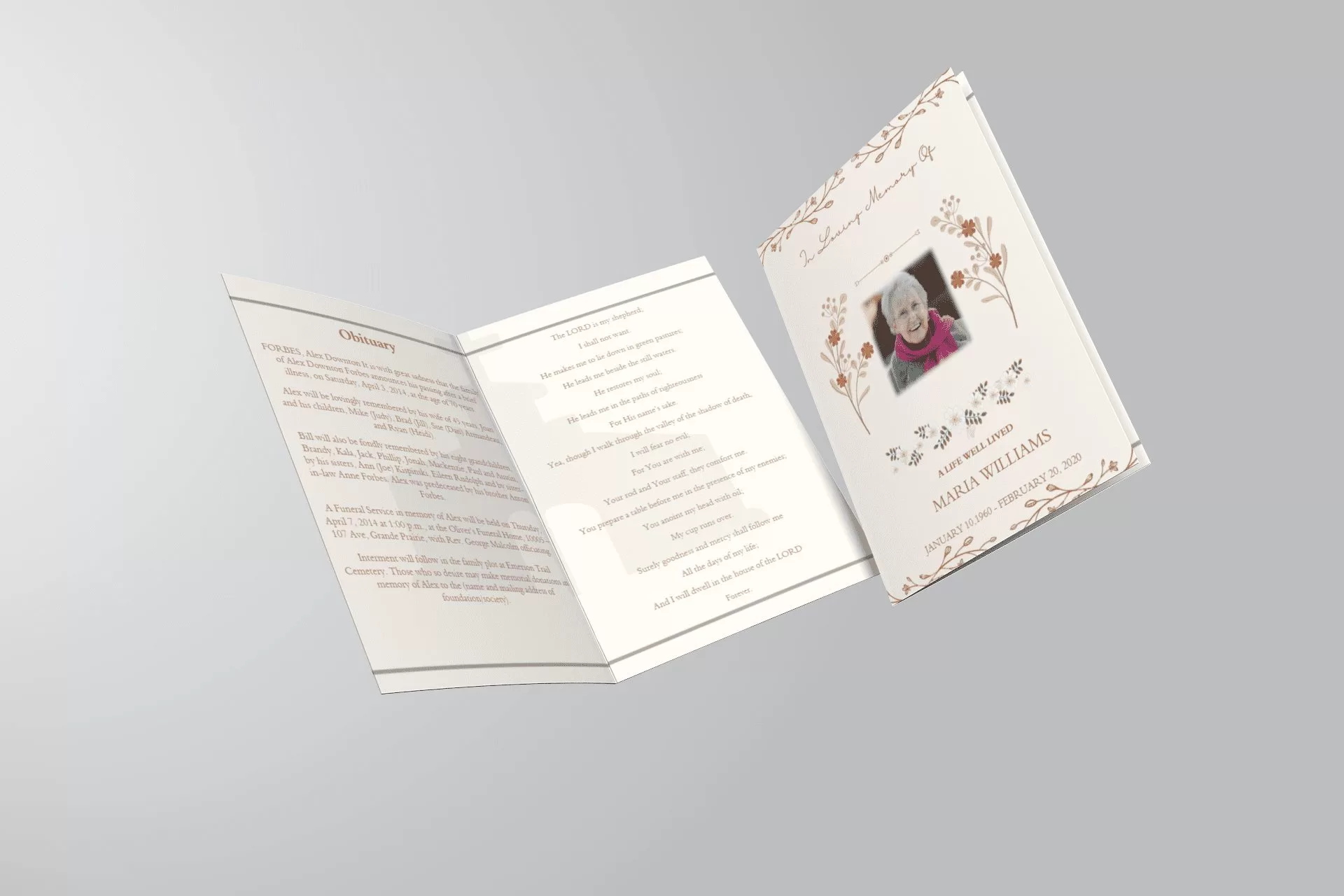
Editable Obituary Template for Mother or Father (Download & Customize)

Editable Obituary Template for Mother or Father

Writing an obituary for your mother or father can feel overwhelming during a time of loss. Our editable obituary templates provide a thoughtful way to share their story, pay tribute to their life, and inform loved ones about memorial service details.

Why Use an Editable Obituary Template?

An editable obituary template saves you time and effort while ensuring the final result is meaningful and professionally formatted. With our Word and online versions, you can:

  • Customize every detail – name, dates, life story
  • Format the text cleanly and respectfully
  • Download and print or post online

Perfect for newspaper submissions, memorial service handouts, or online remembrance pages.

Template Structure (Example for Father)

Here’s a sample layout included in our editable obituary:

Johnathan “John” Smith, 72, of Houston, Texas, passed away peacefully on June 10, 2025. He was a devoted husband, father, and friend to many. A retired firefighter, John dedicated 35 years to protecting and serving his community…

Sections you can edit:

  • Full name, age, location, date of death
  • Career highlights and community service
  • Family members and survivors
  • Funeral/memorial service details
  • Personal notes or favorite quotes

Template Structure (Example for Mother)

Mary Louise Patel, 68, of Chicago, Illinois, passed away surrounded by loved ones on May 28, 2025. She will be remembered for her kindness, creativity, and unwavering dedication to her family…

Each template is formatted for clarity and warmth, ensuring your tribute feels personal and sincere.

How to Use the Template

You can start right away:

  1. Download the Word or PDF version
  2. Edit the text in your preferred language and tone
  3. Save and use in your funeral program, email, or online memorial

Need help writing? Use our obituary examples or free obituary generator tool.

Download the Editable Obituary Template

Get started by downloading your free editable obituary template for:

Or explore all obituary template options to find the one that best honors your loved one.

Obituary Examples – Tips, Examples, and Free Templates

Obituary Examples – Tips, Examples, and Free Templates

Looking for inspiration to write a respectful and heartfelt obituary? These obituary examples will help you understand how to structure your thoughts, honor your loved one, and provide useful details for those grieving. We’ve included writing tips, sample formats, and downloadable templates to get you started right away.

Why Use Obituary Examples?

Writing during a time of loss is emotionally difficult. Reading through real-life obituary examples can offer clarity and provide a thoughtful starting point. They help with:

  • ✔️ Finding the right tone for your message
  • ✔️ Understanding what information to include
  • ✔️ Creating a structured and respectful announcement

Common Elements in a Good Obituary

  1. Basic Info: Name, age, location, date of passing
  2. Brief Biography: Milestones, career, personality
  3. Family: Survived and predeceased members
  4. Service Details: Funeral, memorial, donation info
  5. Closing: A quote, message, or thank-you

Short Obituary Example

“Mary Ellen Johnson, 72, of San Diego, passed away peacefully on May 5, 2024. A loving wife, mother, and retired nurse, Mary dedicated her life to helping others. She is survived by her husband, John, and children, Lisa and Kevin. A private family service will be held.”

Obituary Example for a Veteran

“Thomas William Davis, 84, of Dallas, Texas, passed away on June 2, 2024. A proud U.S. Navy veteran and community volunteer, Tom lived a life of service. He is survived by his wife of 60 years, Margaret, three sons, and seven grandchildren.”

Free Downloadable Obituary Templates

Want to save time and focus on what matters? Download our free editable templates in Word and PDF formats. Whether you’re writing a short notice or a detailed tribute, we have something to help.

Download Free Obituary Examples & Templates »

Writing Tips from Experts

  • ✍️ Use clear and compassionate language
  • 🧠 Focus on personal achievements and values
  • 📏 Keep it concise but complete
  • 📝 Edit and read aloud before publishing

Conclusion

With the right guidance and structure, you can create an obituary that honors your loved one’s legacy. Let these obituary examples inspire you to write something meaningful and lasting.

Need help? Visit our Free Obituary Templates page for resources and ready-to-edit downloads.

Christian Obituary Examples: Faith-Based Tributes to Honor Loved Ones

When a loved one who lived a life of faith passes away, it’s only fitting that their obituary reflects their Christian beliefs and the spiritual legacy they leave behind. Whether you’re writing for a funeral program or a newspaper announcement, these Christian obituary examples can help you express their life in light of God’s grace.


Christian Obituary Example (Detailed):

“Robert James Carter, 71, went to be with the Lord on April 22, 2025, surrounded by his family in Orlando, Florida. Born in 1953, Robert was a devoted servant of Christ, a loving father, and a husband of 45 years to his wife, Ellen. He was an elder at Grace Baptist Church and known for his unwavering faith and kindness. He spent his career teaching high school math, mentoring countless students both academically and spiritually. He is survived by his wife, three children, and seven grandchildren. A celebration of life service will be held at Grace Baptist Church on April 29. His favorite verse, Philippians 4:13, defined his life: ‘I can do all things through Christ who strengthens me.’”


Christian Obituary Example (Short):

“In loving memory of Mary Thompson, 88, who peacefully passed into eternity on March 10, 2025. Her faith in Christ guided her every step. She will be remembered for her joyful spirit and her love for God’s word.”


Bible Verses You Can Include:

  • John 11:25 – “I am the resurrection and the life…”

  • Psalm 23 – “The Lord is my shepherd…”

  • Romans 8:38-39 – Nothing can separate us from the love of God


For more obituary writing examples and downloadable templates in Word and PDF, visit QuickFuneral.com for faith-centered guidance.

Obituary Examples for Husband: Honoring a Beloved Partner

Writing an obituary for your husband is one of the most heartfelt ways to celebrate his life and preserve his memory. Whether you’re preparing for a funeral service or crafting a newspaper announcement, the words you choose matter deeply. Below are meaningful obituary examples for a husband that you can personalize and use.


Obituary Example for Husband (Traditional Style):

“David Richard Bennett, 63, passed away peacefully on the morning of February 18, 2025, surrounded by his loved ones in Raleigh, North Carolina. A devoted husband, father, and friend, David was known for his strength, kindness, and unwavering integrity. He spent 35 years working as a mechanical engineer and was always passionate about helping others. David leaves behind his wife of 40 years, Margaret; their three children, Julia, Adam, and Scott; and five grandchildren. His legacy of compassion and wisdom will live on through his family.”


Obituary Example for Husband (Short Version):

“With deep sorrow, we announce the passing of John William Turner, beloved husband, father, and friend. John touched many lives with his generous spirit and unshakable humor. He will be dearly missed.”

This version is suitable for newspaper obituaries or small funeral programs.


Tips for Writing Your Husband’s Obituary:

  • Start with basic facts: full name, age, date/place of passing

  • Include personal highlights: career, hobbies, passions

  • Mention surviving family members

  • End with funeral details or a closing tribute


For more obituary examples and ready-to-use obituary templates in Word format, QuickFuneral.com provides compassionate resources to guide you.

Obituary Writing Examples: How to Write a Heartfelt Final Tribute

When someone close to you passes away, writing their obituary can feel overwhelming — especially when you’re navigating grief. Whether you’re preparing a newspaper obituary, a funeral program, or a personal message, having good obituary writing examples can ease the process.

At QuickFuneral.com, we offer not just templates but real, compassionate guidance for crafting a meaningful farewell.


What Should an Obituary Include?

A good obituary balances factual information with emotional depth. Here’s what you should generally include:

  • Full name and age

  • Date and place of passing

  • Key life milestones (career, education, marriage)

  • Surviving family members

  • Funeral or memorial details

  • A few personal anecdotes or qualities


Obituary Writing Example (General):

“Robert Allen Jenkins, age 68, passed away on April 2, 2025, in Denver, Colorado. Born in 1957, Robert was a passionate teacher, an avid hiker, and a loving husband and father. He spent over 30 years inspiring students at Central High School. Robert is survived by his wife, Helen; his two sons, Kevin and Jordan; and his grandchildren, whom he adored. A memorial will be held on April 10 at St. Mark’s Church.”

This style is appropriate for newspapers, funeral programs, or online tributes.


Short Obituary Example (Notice Style):

“With deep sorrow, we announce the passing of Jane Carter, 79, on March 1, 2025. A private ceremony was held with close family.”

Shorter notices like these are often used when families prefer privacy or concise publications.

For more styles like Christian, humorous, or formal tributes, visit our collection of obituary examples.


Why Use an Obituary Template?

Explore our downloadable obituary templates in Word format for ease of use.

Obituary Example for a Loving Mother: A Tribute Template to Inspire You

Obituary Example for a Loving Mother: A Tribute Template to Inspire You

Writing an obituary for your mother can be one of the most emotional and meaningful tasks after her passing. It’s a moment to honor her legacy and share the love she brought into your life with others. If you’re unsure where to start, here is an obituary example for a mom that you can personalize.


Obituary Example for Mom:

“Mary Elizabeth Thompson, age 74, passed away peacefully on Monday, May 12, 2025, surrounded by family at her home in Austin, Texas. Mary was born on August 3, 1950, and lived a life filled with kindness, faith, and unwavering love for her family. She was a devoted wife, a nurturing mother to three children, and a beloved grandmother. Her passion for cooking, storytelling, and volunteering at her church touched everyone she met. Mary’s strength and grace continue to inspire those who knew her. She is survived by her husband of 50 years, James, her children Sarah, Michael, and John, and six grandchildren.”

This obituary strikes a balance between factual details and heartfelt tribute. If you’re creating one for a funeral program or newspaper notice, you can use this as a template and modify the tone or length as needed.

You can also find more obituary writing examples and editable obituary templates for Word and PDF formats to help you get started.


Tips for Writing a Mom’s Obituary:

If you’re looking for obituary templates for funeral programs, obituary notes, or newspaper notices, QuickFuneral.com offers ready-to-use formats for every need.

How to Write an Obituary in 2025

Writing an obituary is a meaningful way to honor a loved one’s life and share their legacy. Whether you’re new to the process or seeking guidance, understanding how to write an obituary template can make this task easier. This guide explores everything from the typical obituary format to how to create an obituary template that’s heartfelt and professional. Our goal is to help you craft a tribute that resonates, with a focus on the Obituary Template from QuickFuneral.com.

What is an Obituary?

An obituary is a public notice of someone’s passing, typically published in newspapers or online. It summarizes the deceased’s life, achievements, and surviving family members while announcing funeral or memorial details. But what is an obituary template? It’s a pre-designed structure that simplifies the writing process, ensuring you include all essential elements. Using a reliable Obituary Template can save time and reduce stress during a difficult time.

What is the Basic Obituary Template?

A basic obituary template provides a clear framework for organizing key details. Here’s a typical obituary format:

  • Announcement of Death: State the full name, age, and date/place of passing.
  • Life Summary: Highlight the deceased’s birthplace, education, career, and hobbies.
  • Family Details: List surviving family members and those who predeceased.
  • Service Information: Include funeral, memorial, or visitation details.
  • Special Messages: Add donation requests or personal notes.
  • Photo (Optional): Include a photo for a personal touch.

For a ready-to-use structure, check out the Obituary Template on QuickFuneral.com, which guides you step-by-step.

How to Write an Obituary Template

Wondering how to write an obituary example or how to do an obituary template? Follow these steps to create a meaningful tribute:

1. Gather Information

Collect details about the deceased, including their full name, birthdate, career, hobbies, and family. This forms the foundation of your obituary.

2. Choose a Tone

Decide whether the obituary should be formal, heartfelt, or celebratory. The tone should reflect the personality of the deceased.

3. Follow a Structure

Use the basic obituary template outlined above. Start with a clear announcement, then summarize their life, and conclude with service details.

4. Personalize It

Add unique stories or traits to make the obituary special. For inspiration, explore how to write a simple obituary example using the Obituary Template.

5. Proofread

Ensure accuracy in names, dates, and details. A polished obituary respects the deceased’s memory.

What to Write in an Obituary for the Paper

When writing for a newspaper, brevity and clarity are key. Newspapers often charge by word count, so focus on essential details:

  • Full name and age
  • Date and place of death
  • Key life milestones (e.g., career, marriage)
  • Surviving family members
  • Funeral or memorial service details
  • Optional: A short anecdote or quote

For a concise yet impactful format, the Obituary Template is an excellent resource to streamline your writing.

How to Make an Obituary Template

Creating your own obituary template is simple with the right approach. Here’s how to create an obituary template:

  1. Open a Document: Use a word processor or design tool like Canva for a polished look.
  2. Set Sections: Divide the template into sections (e.g., announcement, biography, services).
  3. Use Placeholders: Include prompts like “[Full Name] passed away on [Date]” to guide users.
  4. Add Styling: Choose a clean font and layout for readability.
  5. Save as Reusable: Store the template for future use.

For a professionally designed option, visit QuickFuneral’s Obituary Template, which is customizable and user-friendly.

How to Write a Simple Obituary Example

If you’re wondering how do you write a simple obituary example, here’s a sample based on the typical obituary format:

John Michael Smith
John Michael Smith, 72, of Springfield, passed away peacefully on April 10, 2025. Born in Chicago, John was a beloved teacher and avid gardener. He is survived by his wife, Mary, children, Sarah and David, and three grandchildren. John was predeceased by his parents, Robert and Ellen Smith. A memorial service will be held at Springfield Community Church on April 25, 2025, at 2 p.m. In lieu of flowers, donations may be made to the Springfield Education Fund.

For more examples, explore the Obituary Template to craft your own.

What to Write on an Obituary Page

An online obituary page allows more flexibility than a newspaper. You can include:

  • A detailed biography
  • Photos or slideshows
  • Guestbook for condolences
  • Links to donation pages
  • Videos or tributes

QuickFuneral’s Obituary Template is perfect for creating a comprehensive online tribute that’s easy to share.

How Often Are Obituaries Updated?

Obituaries are typically published once, shortly after a person’s passing. However, online obituaries may be updated to include:

  • Additional service details
  • New photos or tributes
  • Guestbook comments

If you’re managing an online obituary, the Obituary Template allows for easy updates to keep the page current.

Why Use an Obituary Template?

Using a template simplifies the process and ensures you don’t miss key details. Whether you’re asking what is an obituary example or how to make an obituary template, a pre-designed structure like the one at Obituary Template offers:

  • Time savings
  • Professional formatting
  • Customizable options
  • Stress reduction
Crafting an obituary is a deeply personal task, but it doesn’t have to be overwhelming. By understanding what an obituary is and following a typical obituary format, you can create a tribute that honors your loved one. Whether you’re learning how to write an obituary example or seeking a ready-made solution, QuickFuneral’s Obituary Template is a valuable tool to guide you every step of the way.Start writing today and create a lasting memory with ease. For more resources, visit QuickFuneral.com.
 

Crafting the Perfect Obituary: Templates and Sample Examples

Templates and Sample Examples

Writing an obituary is a meaningful way to honor a loved one’s life and legacy. If you’re searching for guidance, using a sample obituary examples can provide inspiration and structure.

What is an Obituary?

An obituary is a written announcement of a person’s passing, often shared in newspapers, online memorials, or funeral programs. A well-written obituary typically includes:

  • Name, age, and date of passing
  • Brief biography (education, career, hobbies, achievements)
  • Surviving family members
  • Funeral or memorial details
  • A heartfelt tribute or quote

If you’re unsure how to format one, reviewing an example of an obituary can be helpful.

Using an Obituary Template

To simplify the writing process, many people use a template of obituary as a starting point. These templates provide a structured format, ensuring all important details are included.

Types of Obituary Templates

  • Traditional Obituary: Follows a formal structure with essential details. Use a template for obituary to maintain a classic format.
  • Personalized Obituary: A more detailed and heartfelt tribute. Various obituary templates offer different styles.
  • Short Obituary: A concise version suitable for newspaper announcements. Find a template of an obituary to keep it brief yet impactful.

For more options, explore templates for obituaries to find one that best fits your needs.

Sample Obituary Layouts

Formatting an obituary properly ensures clarity and professionalism. Using sample obituary layouts can help structure your message effectively.

Key Elements of an Obituary Layout

  1. Header: Full name, age, and date of passing.
  2. Introduction: Brief summary of the individual’s life.
  3. Biographical Details: Career, achievements, and hobbies.
  4. Survivors: Names of close family members.
  5. Funeral Arrangements: Date, time, and location.
  6. Personal Touch: A favorite quote or memory.

For a ready-to-use format, consider downloading an obituary template to simplify the process.

Writing an obituary doesn’t have to be overwhelming. By using sample obituary examples and structured obituary templates, you can create a heartfelt tribute that honors your loved one’s memory. Whether you need a template of obituary or a guide on structuring the content, these resources will help you craft a meaningful obituary with ease.

For additional resources and templates, visit QuickFuneral today.

Writing the Perfect Obituary: Examples and Samples to Guide You

Losing a loved one is never easy, and writing an obituary can feel like an overwhelming task. However, a well-crafted obituary serves as a heartfelt tribute, celebrating the life and legacy of the departed. If you’re unsure where to start, reviewing an example of obituary can provide guidance and inspiration.

What is an Obituary?

An obituary is a written announcement of a person’s passing, often published in newspapers or online memorial pages. It typically includes key details such as:

For reference, here’s a sample obituary to help you structure your writing.

Examples of Obituaries

Every obituary is unique, reflecting the personality and legacy of the departed. If you’re looking for examples of obituaries, consider these formats:

Traditional Obituary

A formal and respectful announcement, often following a standard template. You can check out a sample of obituary for a structured approach.

Personalized Obituary

A more heartfelt and detailed account of the deceased’s life, highlighting their personality, achievements, and impact. Browse through obituaries samples to see how others have honored their loved ones.

Short Obituary

For newspapers with limited space, a concise version of the obituary focuses on essential details. If you need samples of an obituary, check out these well-crafted examples.

How to Write an Obituary

If you’re unsure how to begin, here’s a step-by-step guide:

For more inspiration, refer to this obituary example that beautifully captures a loved one’s story.

Finding the Right Words

Writing an obituary is a deeply personal process. If you need assistance, these samples of obituaries can guide you in crafting a meaningful tribute. Whether you want a traditional, heartfelt, or brief obituary, exploring different samples of an obituary can help you find the right words.

Honoring a loved one’s life through an obituary is a meaningful way to preserve their memory. If you’re looking for inspiration or guidance, these samples of obituaries provide helpful starting points. Whether you’re writing for a newspaper, an online memorial, or a personal tribute, a well-crafted obituary can serve as a lasting remembrance of a cherished life.

For more resources and templates, visit QuickFuneral today.

Back to Top
Product has been added to your cart
Compare (0)